It’s now a reality. We can finally use Custom Properties or CSS Custom Properties!
But first, let’s start with a solid <h2>, followed by a brief <p> summary.
CSS Custom Properties
Or, how to work magic in your CSS stylesheet.
CSS Custom Properties introduce a “new” concept in CSS: the use of variables natively within your CSS—and even from JavaScript.
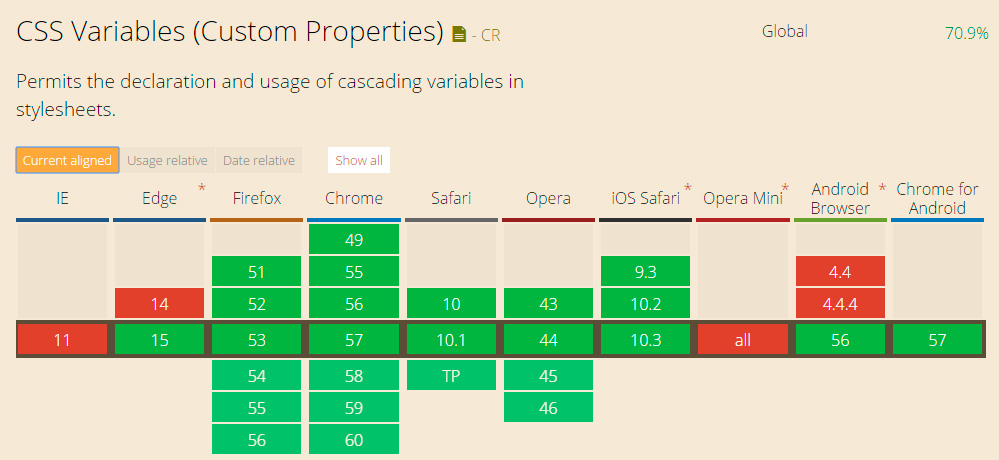
Why “new” in quotes? You’re probably familiar with CSS preprocessors. They’ve been all the rage, but with the arrival of Custom Properties and as browser support grows, preprocessors are on their way out. At the end of this article, you’ll find a browser support table, but spoiler: around 70% of users already have a browser that supports Custom Properties.
CSS and Custom Properties
To see the difference, let’s compare a standard CSS stylesheet without Custom Properties to the same stylesheet rewritten using Custom Properties.
Suppose we want a body with a specific background color, which we’ll later use for text color in a layer, and we’ll also use the body’s text color as the background color for that layer.
Layer 1 will have 20px padding—the same value as the margin-top for layer 2.
body{
     background-color:#1b1b1b;
     color:#fff;
}
.capa1{
     padding:20px;
     color:#1b1b1b;
     background-color:#fff;
}
.capa2{
     margin-top:20px;
}
Now, let’s recreate the same example, but this time using Custom Properties.
:root{
     --color1:#1b1b1b;
     --color2:#fff;
     --mainSpacing:20px;
}
body{
     background-color:var(--color1);
     color:var(--color2);
}
.capa1{
     padding:var(--mainSpacing);
     color:var(--color1);
     background-color:var(--color2);
}
.capa2{
     margin-top:var(--mainSpacing);
}
With :root, we declare variables that are accessible throughout the entire CSS document. Use a double dash — to define a variable and its value. Then, to use the variable, simply call var(–VARIABLE);.
Now imagine the benefits in a stylesheet with over 1,000 lines of code. If you need to update a value, you only have to change it in one place, and it updates everywhere.
Taking it further
Or even two steps further. CSS Custom Properties let you perform calculations, use conditional logic, and set default values if a variable isn’t defined. Sounds like JavaScript, right? But you can do all this directly in your CSS.
You can add, multiply, compare values, and apply different values based on conditions.
.caja{
     /*If variable1 isn’t set, 10px will be used*/
     margin-top:var(--variable1, 10px);

     /*You can also use another variable as a fallback*/
     padding-top:var(--variable1,var(--variable2));

    /*You can add, subtract, multiply, and divide (*note the spacing for addition and subtraction)*/
     padding-top:calc(var(--variable1) + 10px);
     height:calc(var(--variable1) - 5px);
     line-height:calc(var(--variable1) * 2);
     width:calc((var(--variable1) - 5px)/2);

}
More examples:
:root{
     /*You can create text to be inserted later with :before*/
     --text:"Click to view";
}
.caja:before{
     content:var(--text);
}
.caja2:before{
     /*You can append more text after your variable (e.g., a project link)*/
     content:var(--text)' our full project';
}
.caja2:before{
     /*Or use it for a news link*/
     content:var(--text)' our news';
}
Conditional example:
:root{
     /*Accessible via JavaScript*/
     --variableCond: if(x > 5) this.width = 10;
}
Browser support
As you can see, virtually all browsers support Custom Properties… Except Explorer! What a surprise, I DIDN’T SEE THAT COMING! It’s a reminder of those glorious years when we had to jump through hoops to make things work in Explorer 6.
Fortunately, unlike back then, now less than 4% of users are on Explorer. Not a big deal.
Currently, 70.9% of users have browsers that support Custom Properties. That’s a huge number.