A few days ago, we published a post about How much does a website cost? If you’re looking for information on website pricing, that previous post is a must-read. Here’s the link again—seriously, check it out. In that article, we provided exact figures for website costs. We discussed the different types of websites and the price ranges you can expect. Let’s recap the types of websites available, from the simplest to the most complex: starting with a basic site builder, a template-based site, a single-page website, a static website, a basic content management system, and an advanced content management system.
While it’s never easy to pin down how much a website costs, we’re going to dig deeper for those of you looking for a definitive guide.
Browse the posts in this series
- How much does a website cost? Pricing
- How much does a website cost? Features
- How much does a creative website cost?
- How much does a website cost? Assets
Beyond what we covered in the previous post—which I strongly recommend you read if you haven’t already (yes, I insist)—one of the biggest factors influencing the cost of a website is the special features you want to include. What do we mean by special features? Things like a user registration system, online payment integration, advanced forms, and so on.
If you’re considering hiring a web development service, this post will help you determine whether you really need these special features, as they can significantly increase the price of your website.
How much does a website cost? It largely depends on the features
Automated user registration system
We’re often asked to implement user registration systems when starting a web design and development project. However, many clients are surprised by the price tag attached to what seems like a “simple” feature. In reality, a user registration system usually requires building out advanced functionality.
For example, you might want users to be able to upload images to your site and vote on images uploaded by others.
The possibilities are endless—and the more complex your requirements, the higher the cost of your website.
Private user areas and similar features
A private user area is a hidden section of your website that only certain users can access.
For instance, you might want to provide a product catalog that’s not visible to the general public. Or you could set up a press area for journalists, where they can download your logo, high-resolution images, and other materials needed to write about your company.
This is another key factor that can significantly impact how much your website costs, so it’s important to consider whether you really need it.
Advanced search with filters and categories
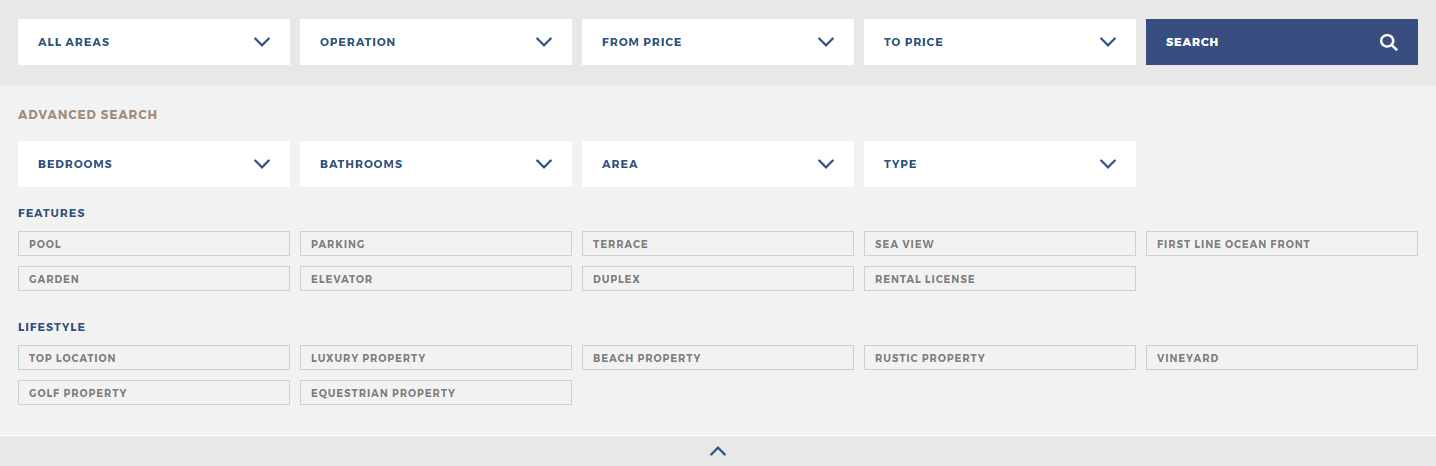
If you want to add an advanced search tool with filters, categories, and more, this will also increase the cost of your website. The more granular you want your search options, the more expensive your site will be. Setting up basic categories to filter content is relatively straightforward. Things get more complex when you want to add subcategories. And if you want to filter by other fields—like dates or more specific criteria—the cost of your website will increase accordingly.
Advanced form submissions
Here, we’re not talking about a standard contact form where users simply enter their name, email, and a message. We mean a much more comprehensive form, where you might even send users a personalized response based on their answers.
This could be an event registration form that collects a wide range of personal information.
These types of forms require a series of checks and validations on the data users submit.
Another example: an online quiz where users answer a series of questions and, at the end, receive a personalized product recommendation based on their responses—helping you offer exactly what they need.
As with other features, the price will depend on the complexity involved, which will directly affect the cost of your website.
Online payment gateways
As you probably know, an online payment gateway allows you to accept payments from your customers—for example, when they purchase a product, sign up for an online course, or pay to attend an event.
To do this, you’ll need to set up a payment gateway, whether it’s custom-built or uses an existing service like Stripe, PayPal, etc.
These features tend to be costly because they involve handling sensitive data and must be implemented with great care. All user data must be validated, and every security aspect considered—otherwise, vulnerabilities could have serious consequences.
Integration and management of APIs or external services
By integrating APIs or external services, we mean using data provided by a third-party company. Typically, this data is delivered in a specific format—such as an XML or JSON file—via a REST service. Usually, this data can be managed through the API provided by the company, so you’ll need to review the documentation to ensure everything works correctly.
This can be a bit technical, so let’s look at an example to clarify, especially if you don’t have a programming background.
Imagine you have a real estate website listing all the properties in your own database. As long as you’re displaying data you’ve entered yourself, there’s no problem. The challenge arises when, in addition to your own listings, you also want to display properties from an external service—and you want this data to stay perfectly synchronized. In this case, you’ll need the service you’ve contracted to provide all the property data you want to add to your database. To achieve this, you’ll need to use a REST service that sends data in XML or JSON format, so you can properly import those listings.
The cost for this kind of integration can increase significantly, depending on the complexity of the system you want to connect to. It also depends on whether the service or API provides all the features you need and is well documented. The more custom work required, the more development hours are needed—which, in turn, increases the cost of your website.
How many languages will your website need?
Language options will also affect your website’s price. The more languages you want to include, the higher the cost. It’s also important to consider the overall size of your website. The more pages and content you have, the more elements will need to be translated. Translating a website with four sections is very different from translating one with twelve sections and three complex forms.
Conclusion
As you can see, while we can’t provide exact prices for every feature, we can highlight the factors that will drive up your website’s cost once you’ve defined the type of website you want.
Many clients don’t realize that the price of their website increases significantly due to extra features they request, though we always try to make this clear when delivering a quote.
That’s why it’s a good idea to ask yourself:
- Do we really need these features? Is it worth the investment, or is it an unnecessary “nice-to-have”? Remember, this has a major impact on how much your website will cost.
- Do we need all these extra features from day one, or could we add them in a second phase?
If you truly need these features, then so be it—the website will cost what it costs. But if you can postpone some features to a later phase, you can spread out the investment and have the chance to reassess whether they’re really necessary once your basic site is up and running.
Browse the posts in this series
- How much does a website cost? Pricing
- How much does a website cost? Features
- How much does a creative website cost?
- How much does a website cost? Assets