Blog
24/04/2017

When We Designed Websites for Internet Explorer

Gone are the days when designing any website meant making sure it would display properly in our beloved Internet Explorer.

Back then, the vast majority of users relied on Internet Explorer.

I’m talking about the era when Internet Explorer 6.0 ruled the browser world. A king, perhaps a bit dim-witted, possibly the result of a little too much inbreeding—something commoners like us can’t quite grasp, but royalty… Well, just watch Game of Thrones and you’ll get the idea. Or read up on the succession history of a certain Spanish family.


How things have changed!


It was 2009, and Firefox had been battling—mostly in vain—to dethrone Internet Explorer 6.0 from its spot as the most-used web browser. Not long before, Google Chrome had joined the fray as Firefox’s ally in this long struggle for dominance. At the time, Internet Explorer 6.0 came pre-installed on every computer running Windows XP—which was most computers.

But it wasn’t just IE6 we had to worry about. Versions 7 and 8 had also arrived, and they didn’t exactly make things easier. Each brought its own special “developer, we’re going to ruin your day” quirks. The cure was worse than the disease: now, we had to make sure a website looked right in three different versions of IE, each interpreting CSS in its own peculiar way. It was like trying to solve a Rubik’s Cube—fix a visual bug in version 7, and it would break in 6 and 8, and vice versa.

Internet Explorer was the problem child. The spoiled kid who needed a special meal, or else he just wouldn’t eat.


The battle to build any website

Building the CSS layout for any website was a real ordeal. You had to make the same design work across all versions of Explorer, which, as mentioned, didn’t even play nice with each other. And after wrestling with all those visual bugs, the site still had to look right in the other decent browsers: Firefox and Chrome.

Most of the time, you’d run into endless problems, usually caused by the ugly (and only) ways to hack CSS rules for Explorer. In short, designing and building a site for multiple browsers meant the difficulty level increased exponentially.
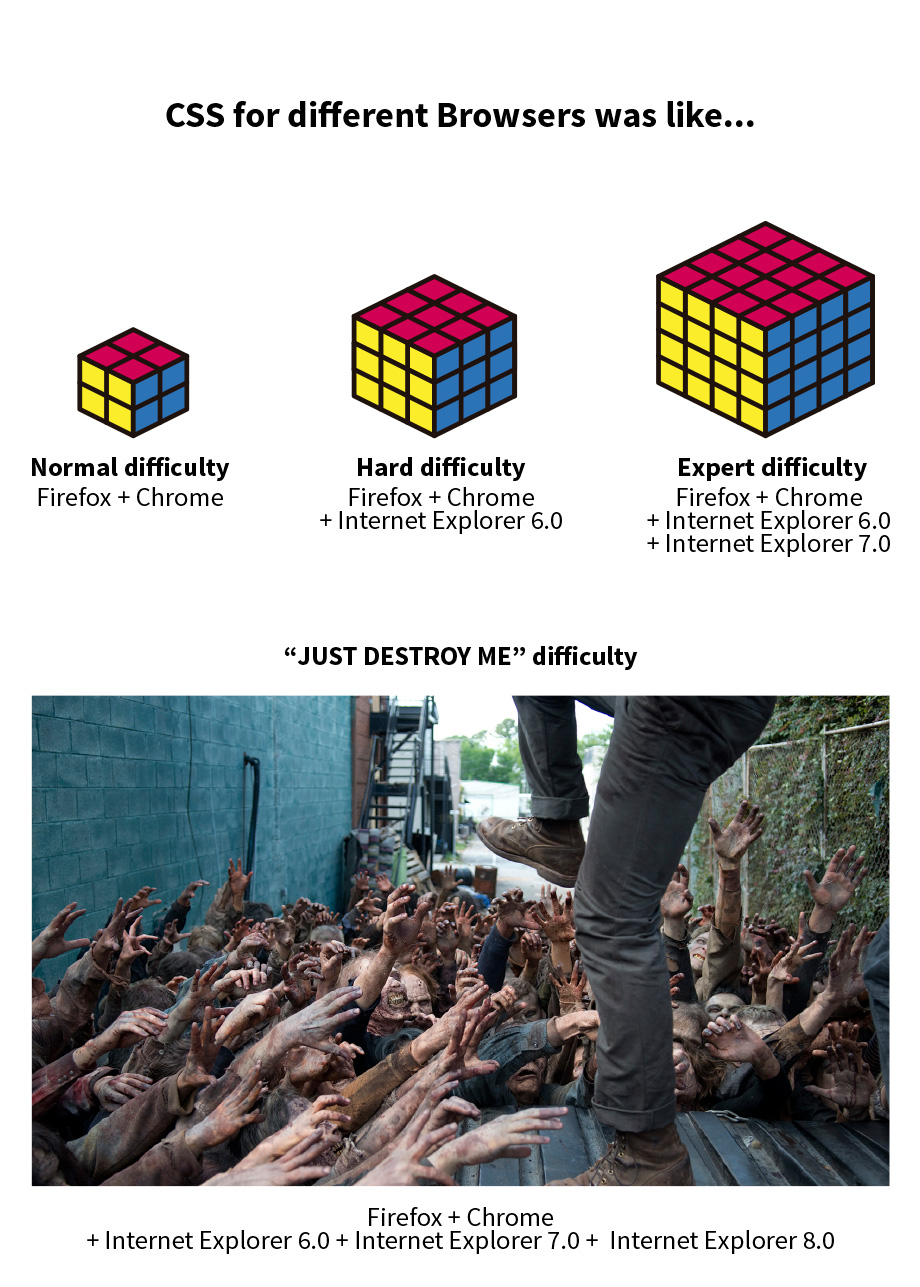
css for different browsers

Designing a website today

Fortunately, things have changed a lot, and the landscape is much more stable now. Internet Explorer accounts for only about 4% of web users. And to be fair, in its latest versions, even though it still lacks support for many of the newer “special” features, it behaves reasonably well.

You could say that today’s new-generation front-end developer who complains about the challenges of building a website is a bit like a millennial compared to our grandparents who did military service. Honestly, a few days with the legendary “Drill Sergeant” wouldn’t do them any harm.

Did you like it?
Related articles
Ready to start
your project?

We assess your current situation and outline the next steps.

Contact now
Our site uses cookies to collect information about your device and browsing activity. We use this data to improve the site, ensure security and deliver personalized content. You can manage your cookie preferences by clicking here.
Accept cookies Configure Decline cookies
Basic cookie information
This website uses cookies and/or similar technologies that store and retrieve information when you browse. In general, these technologies can serve very different purposes, such as, for example, recognizing you as a user, obtaining information about your browsing habits or personalizing the way in which the content is displayed. The specific uses we make of these technologies are described below. By default, all cookies are disabled, except for technical ones, which are necessary for the website to function. If you wish to obtain more information or exercise your data protection rights, you can consult our Política de cookies".
Accept cookies Configure
Technical cookies needed Always active
Technical cookies are strictly necessary for our website to work and for you to navigate through it. These types of cookies are those that, for example, allow us to identify you, give you access to certain restricted parts of the page if necessary, or remember different options or services already selected by you, such as your privacy preferences. Therefore, they are activated by default, your authorization is not necessary.rnThrough the configuration of your browser, you can block or alert the presence of this type of cookies, although such blocking will affect the proper functioning of the different functionalities of our website.
Cookies de análisis
Las cookies de análisis son las utilizadas para llevar a cabo el análisis anónimo del comportamiento de los usuarios de la web y que permiten medir la actividad del usuario y elaborar perfiles de navegación con el fin objetivo de mejorar los sitios web.
Confirm preferences
contact us
Form

Tell us
your project

Indicate the general context of your organization and the planned scope of the project.
Code Barcelona, ​​as responsible for the processing of your data, will process it in order to respond to the query and/or request that you make to us through this contact form. Privacy Policy.
Title
Popupcontent
Analysis of your digital situation

We will review your current digital situation. We will get in touch to understand your context and jointly assess which areas to analyze, after which we will prepare an audit including key findings and recommendations.

Code Barcelona, ​​as responsible for the processing of your data, will process it in order to respond to the query and/or request that you make to us through this contact form. Privacy Policy.
Aceptar